
Case Study · Chalkboard ~8 min read · 5 chapters

Chalkboard · Building Trust at the Front Door

Onboarding, Verification & Refer-a-Friend · iOS + Android · 2025
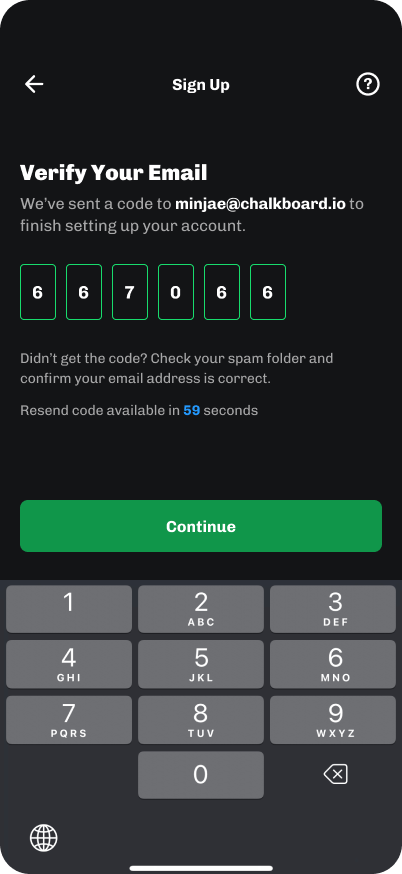
Email verification code entry
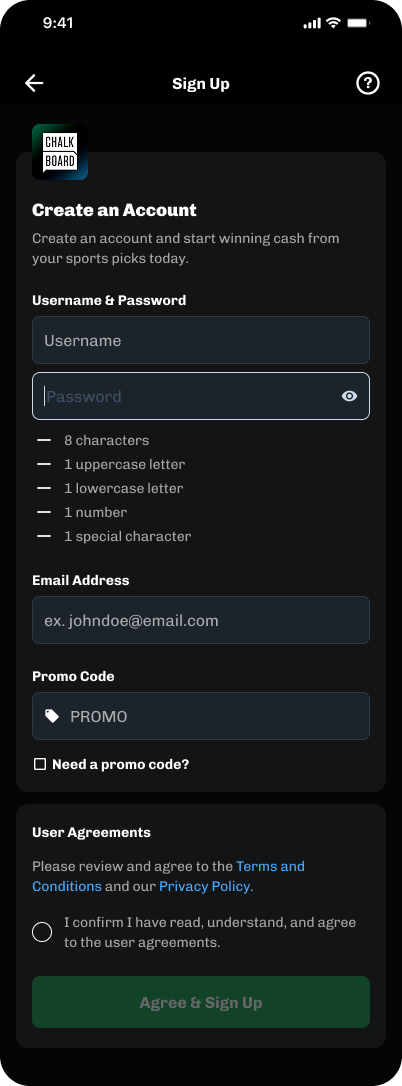
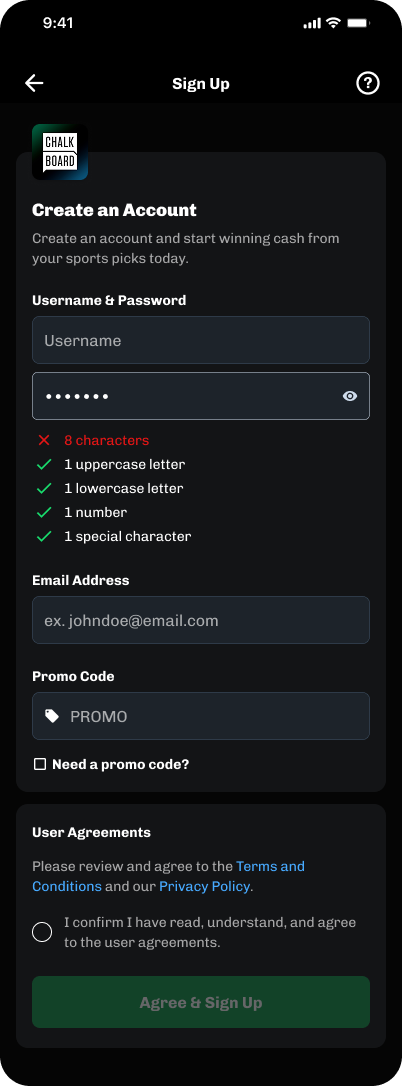
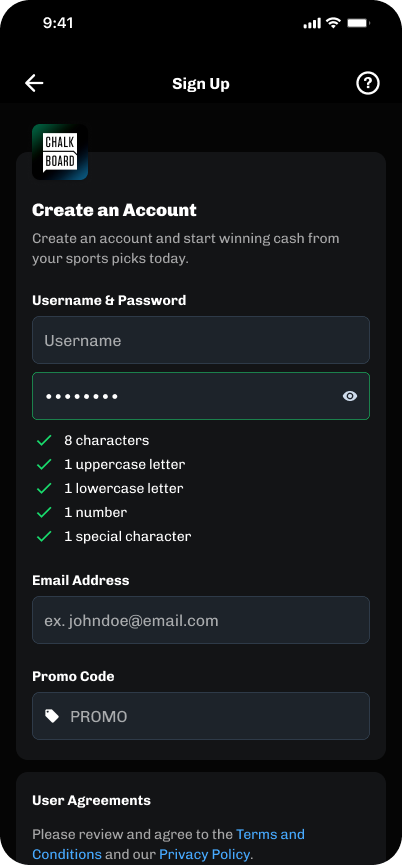
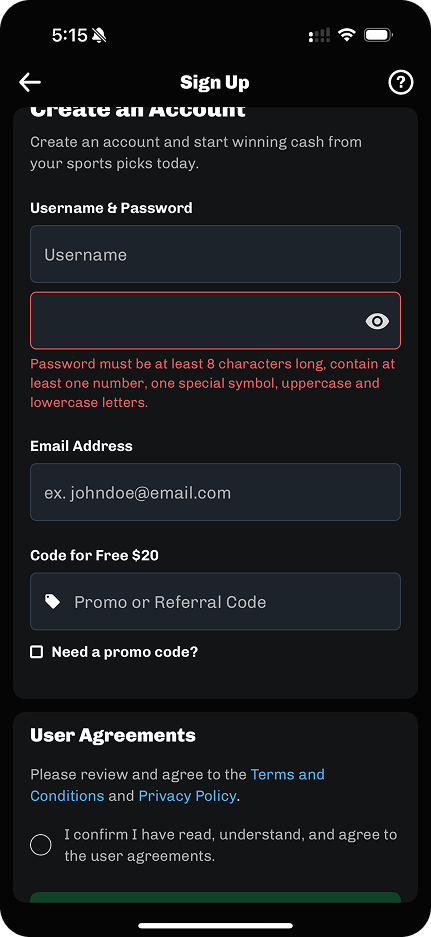
Account creation with live password validation
Notification opt-in prompt for win and promo alerts
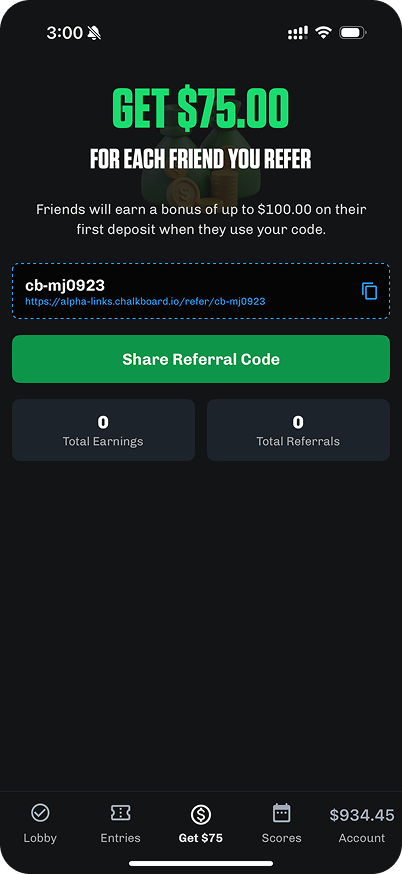
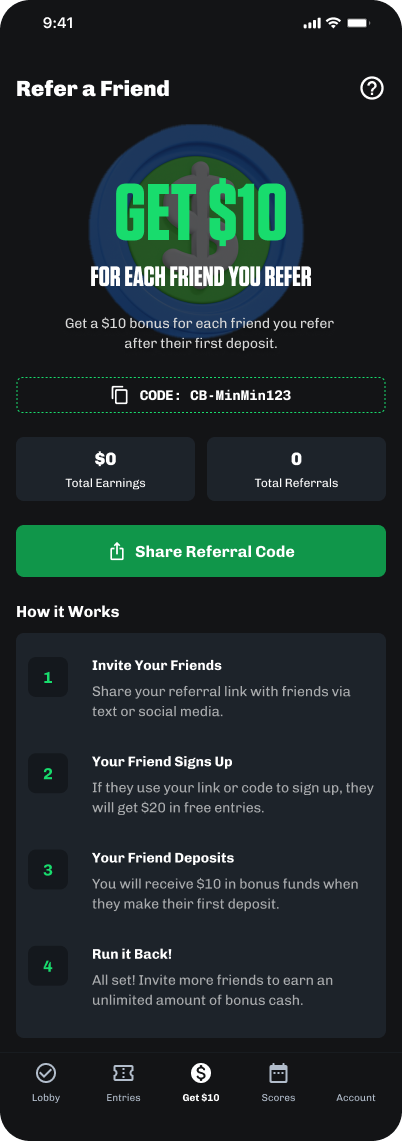
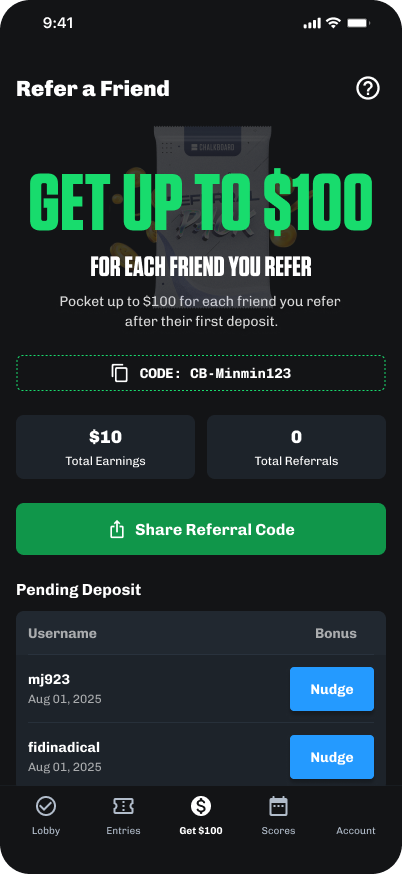
Refer-a-Friend V2 with gamified referral rewards

Selected screens · verification, validation, alerts, and referral · iOS + Android · 2025

As Senior Product Designer at Chalkboard from July to November 2025, I led growth design across iOS and Android, with the front door, registration and the account layer, as the highest-leverage surface. An audit found it was leaking in a way nobody had instrumented: verification was happening too late, account-creation errors were hiding behind a single generic toast, and a stale refer-a-friend loop wasn't pulling its weight.

The work resolved into one arc. First, rebuild the front door so every account is real and reachable, email verification moved into registration, a unified validation system for password and username, and a notification system designed around iOS's one-shot permission constraint. Then, turn those verified accounts into growth: ship a refreshed Refer-a-Friend V1, with a V2 designed to ride the promotion engine I was building in parallel.

  • Email verification (the headline): Moved into registration, with the KYC-degradation and email-delivery edge cases, four error treatments, an A/B-tested consent prompt, and the transactional email template all mapped.
  • A unified validation system: Instant, two-tier validation for password and username, applied identically across sign-up, change-password, and forgot-password, replacing late, generic errors.
  • A notification re-ask system: Permission asks sequenced to high-intent moments, win, promotion, and withdrawal alerts, because iOS only lets you ask once.
  • Refer-a-Friend V1 → V2: Shipped a refreshed V1 gated on verified accounts, then designed a V2 that moves the reward model onto the promotion engine, with gamified referral packs that would land the moment a referred friend makes their first deposit.
Role
Senior Product Designer · Growth
Date
Jul 2025 – Nov 2025
Platforms
Native iOS Native Android
Output
Email verification · flow, edge cases, email template Unified password & username validation Notification re-ask system · 3 touchpoints Refer-a-Friend · original to V1, with V2 on the promotion engine as a future follow-up

The front door was leaking.

Onboarding wasn't broken, it was leaking in a way nobody had instrumented: verification ran too late, account-creation errors hid behind one generic toast, and the referral loop hadn't been touched since launch. The work splits into two moves, harden the front door so accounts are real and reachable, then turn those accounts into a growth loop. Each chapter below is one of them.

Trust & the Front Door

Email verification moved into registration as the headline. A unified validation system gave password and username instant, state-specific feedback across every flow. A notification re-ask system sequences permission to high-intent moments. The throughline: accounts the product can actually reach.

Refer-a-Friend & the Promotion Engine

V1 refreshed the state-gated referral screen and shipped; the proposed V2 moves it onto the promotion engine, with gamified referral packs that would land the moment a referred friend makes their first deposit, reusing the app's own pack mechanic so marketing could ship offers without an engineering ticket.

Spotlight · Verification process revamp

Moving email verification into the sign-up flow.

Phone verification ran at registration, but email was collected and never confirmed. That gap was the single largest source of unreachable users in lifecycle marketing, and it was hiding in the funnel as a "high signup rate" the team was quietly proud of.

Current flow

Sign-up runs on phone + identity (KYC) verification. Email is collected but never confirmed.

Pain point

Per the marketing team's lifecycle data, an estimated 70–80% of sign-ups arrived with a missing or invalid email, the single largest source of unreachable users.

Goal

Enable reliable email communication for important and promotional messages. Keep the flow minimally invasive while retaining phone-based recovery.

Solution

Add email verification to the sign-up flow. Ensure users confirm ownership before completing registration.

Opportunity

Strengthen relationships with users through verified communication channels. Use verified emails as a foundation for engagement and future features.

The system map

One spine. Twelve branches. Every edge pinned to the step it protects.

This project was flow-map work, so it's presented as one: the updated registration spine runs left to right, and each edge case, error treatment, test, and deliverable hangs off the exact step where it strikes. Tap any branch.

5 spine steps 12 branches 3 KYC recovery paths 4 error treatments 1 net-new email template
Edge case Error treatment A/B test Deliverable
1 Phone verification Retained for recovery
2 Email entry New step · consent subtext
3 Code entry Six-digit code, sent by email
4 Basic Info KYC pre-fills identity
5 Registration complete Verified by construction
Edge case · KYC returns no name

The identity provider comes back without a name. Instead of restarting verification, a recovery form asks only for the missing field and rejoins the spine.
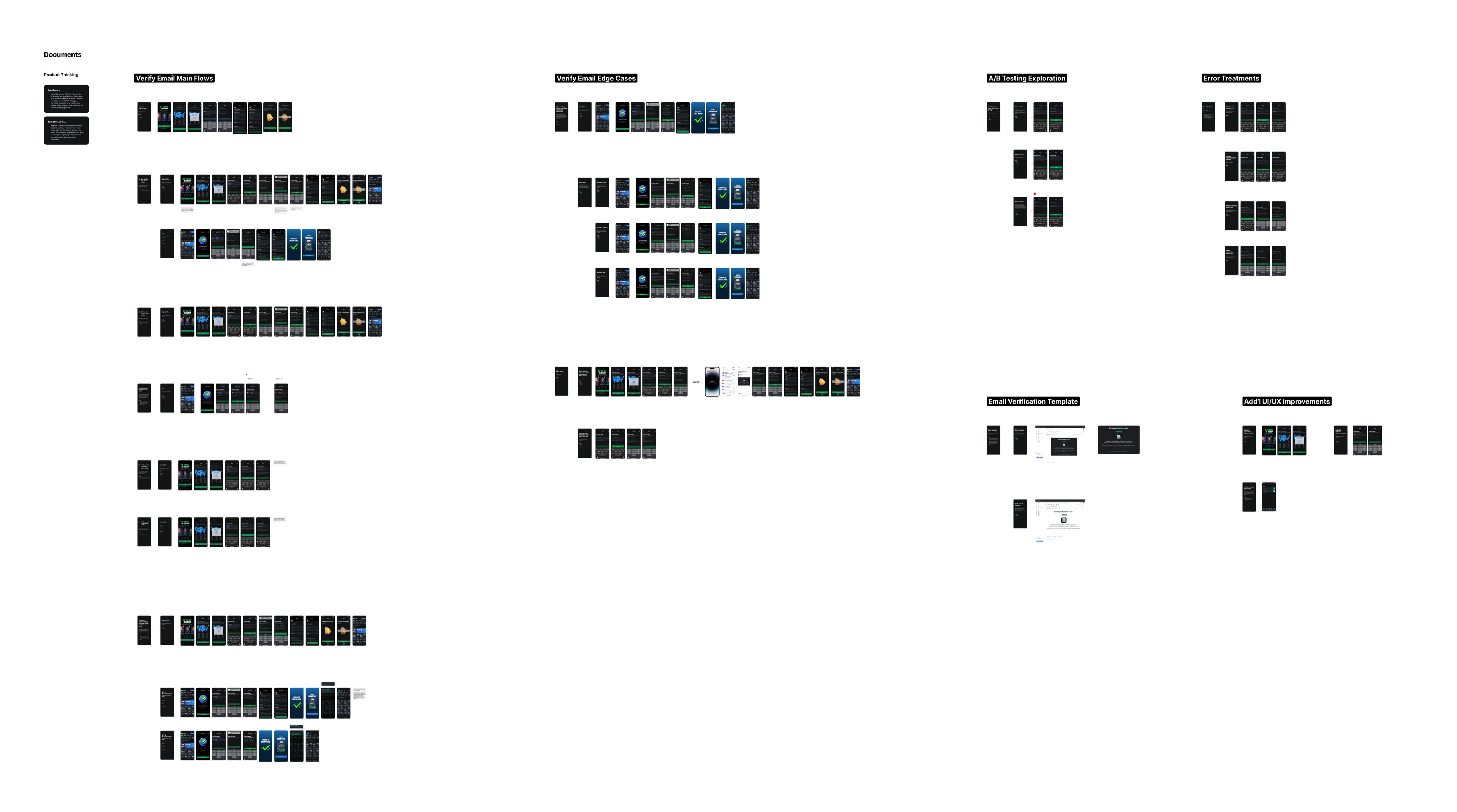
The board behind the map.

Every branch above was mapped on a single working board before any UI state was drawn, KYC degradation, the cross-app email journey, every error and test. Shipping alongside it: a typography-alignment pass and a CTA-color pass across every screen the flow touched.

The full Verify Email working board: main flows, edge cases, error treatments, A/B testing, email template, and additional improvements, mapped end to end.
Open in Figma ↗
What it unlocked

An email-marketing preferences surface in settings, Promotions, Product Updates, and Deposit Receipts, the downstream payoff a verified address makes possible. Verification was the means; reachable lifecycle marketing was the end.

Result · By design

The delivered design makes a confirmed email a required step to complete registration, closing, by design, the channel gap the marketing team's 70–80% baseline had quantified. No new account finishes the standard flow without a reachable address.

Two systems finish hardening the front door.

Email verification was the headline. The other two moves are quieter but no less systemic, one validation pattern that makes password and username self-explanatory across every flow, and a permission system that earns the notification opt-in instead of demanding it.

Front door · Validation system

One validation pattern for password and username, across every flow.

The legacy fields validated late, on whole-form submit, and failed with a single generic error. I replaced that with instant, field-level validation that tells the user exactly what's wrong as they type, then applied the identical pattern to password and username across sign-up, change-password, and forgot-password.

2-tier Validation model Instant client-side checks + an API check on tap-out.
3 Flows unified Sign-up, change-password, and forgot-password share one pattern.
2 Live bugs fixed A stale error and a Save button enabled during an error state.
The audit found

Validation only ran when the user submitted the whole form, and everything, too short, missing a character type, a taken username, a banned character, returned the same opaque failure. Users had no idea what to fix, and the credential step was a silent drop-off point.

The move
  • Instant, field-level feedback. A live requirement checklist resolves as the user types; errors surface under the field, not as a toast.
  • Two-tier validation. Cheap rules (length, character set, the auto-block at username's 21st character) run instantly client-side; uniqueness and minimum requirements run via API on tap-out.
  • One pattern, three flows. The same interaction ships identically in sign-up, change-password, and forgot/reset, so the two fields read as one system.
Proof · two bug tickets

Caught and fixed two live defects in the change-password flow: the Save button staying enabled while a wrong-password error was showing, and a "password is wrong" error that persisted after the user had already corrected it.

Front door · Notification system

iOS lets you ask once. So I designed the asking.

The native permission prompt was firing cold, mid-onboarding, and once a user denies it the only recovery is a trip to Settings, which almost no one takes. Rather than fight the OS prompt, I built a system around its one-shot constraint: a primer before the first ask, and contextual re-asks tied to moments the user has already shown they care about.

3 Re-ask touchpoints Post-first-entry, post-daily-drop, post-withdrawal.
1 Primer before the ask Frames the value before the OS prompt ever fires.
0 Wasted asks Each prompt is segmented to the alert the user just engaged.
The audit found

The OS prompt fired immediately after KYC with no context. Decline was high, and a denied user is a permanent lifecycle-reach leak, the only re-enable path is buried in iOS Settings, where almost no one goes.

The move
  • Primer first. A single screen frames what notifications are for before the OS prompt ever appears.
  • Re-ask at high intent, segmented. If the user declines, the ask returns at three earned moments, after their first entry (Win Alerts), after their first Daily Drop (Promotion Alerts), and after a withdrawal (Withdrawal Alerts), each asking only for the alert type they just engaged with.
Why it works

The ask arrives when it's relevant instead of when it's convenient for the funnel, so fewer users end up stuck in the silently-denied state, the one place the OS gives you no second chance.

Refer-a-Friend · V1 → V2

From a state-gated referral screen to a reward that rides the promotion engine.

V1 was already state-aware, but the reward was a stack of flat $10 entry cards bolted on by hand. V2 is a proposed follow-up that moves the economics onto the promotion engine I was building in parallel: one dollar reward, capped at "get up to $100," delivered as a gamified referral pack, the same pack mechanic the app already uses, dropped the moment a referred friend makes their first deposit.

$10 → $100 Reward model redesigned Flat $10 cards collapse into one capped sum on the promotion engine.
FTD Reward trigger Pack delivered at the referred friend's first deposit.
Claim All Multi-pack edge case Stacks of earned packs claimed in a single action.
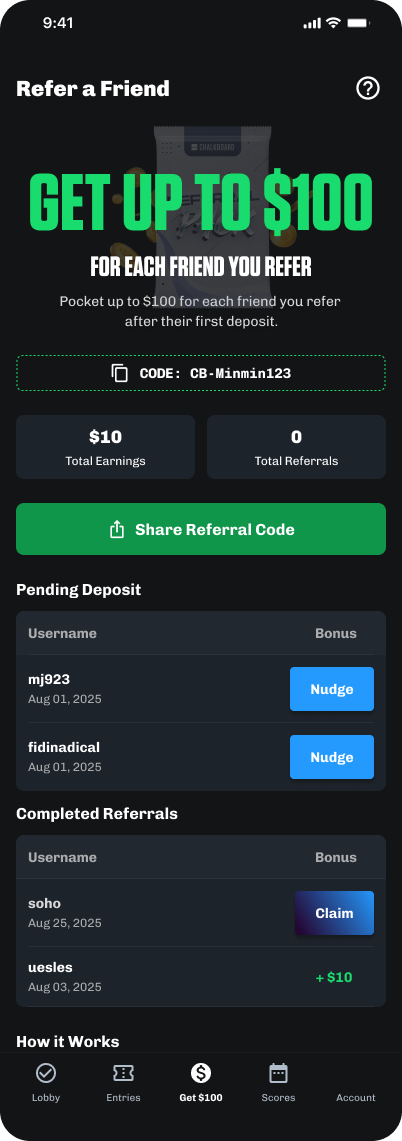
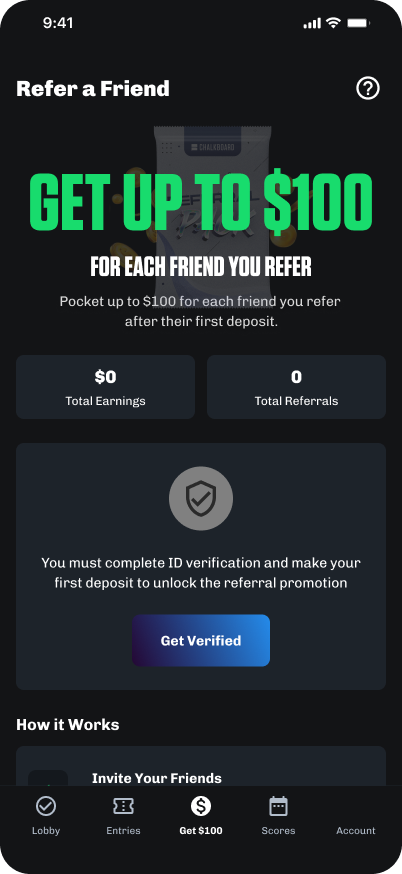
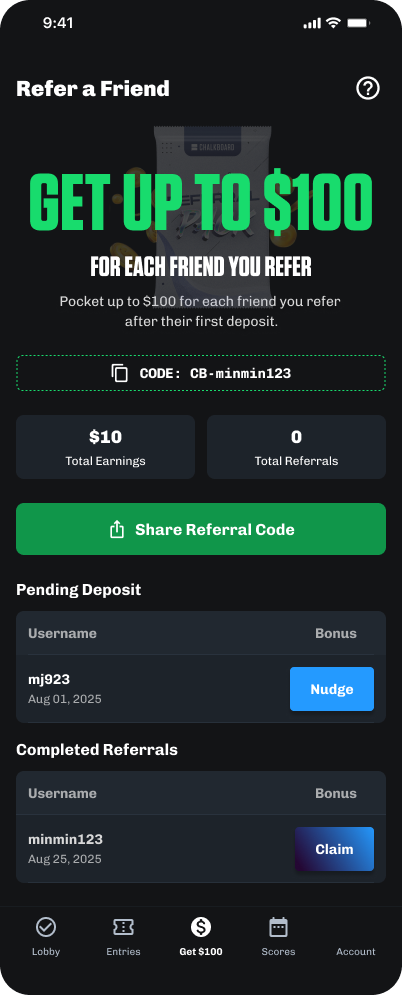
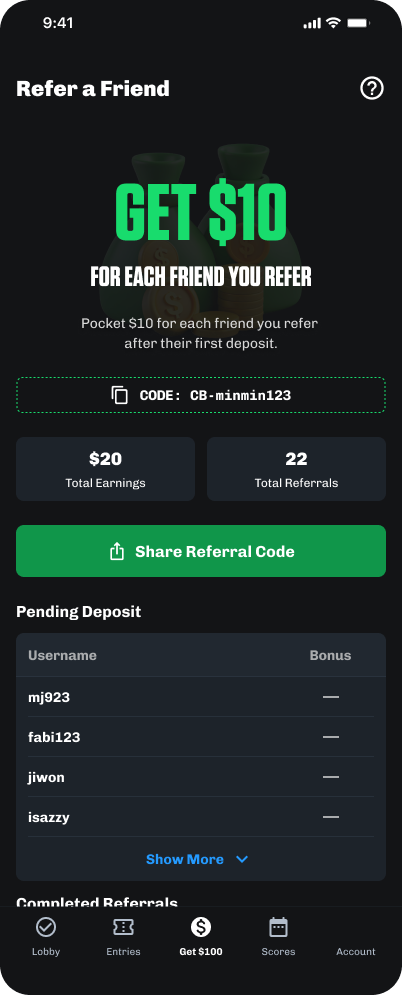
Refer-a-Friend · the original screen I inherited Refer-a-Friend V1 landing · Get $10 Refer-a-Friend V2 landing · Get up to $100
Original
Where V1 landed

V1 was already state-aware, the screen gated referral behind ID verification and a first purchase, and tracked pending vs completed referrals. The economics: your friend got $20 in free entries at sign-up, you got $10 in bonus funds at their first deposit, uncapped, with each reward a hand-assembled entry card and no system behind it.

What V2 proposes
  • One reward on the promotion engine. The $10-card stack collapses into a single dollar sum, framed as "get up to $100," delivered as a referral pack reusing the app's existing pack-reveal so it feels native, not bolted on.
  • Triggered at first deposit. The pack drops at the referred friend's FTD, the moment the referral actually has value, not at sign-up, with a Claim button surfacing on the referrer's dashboard.
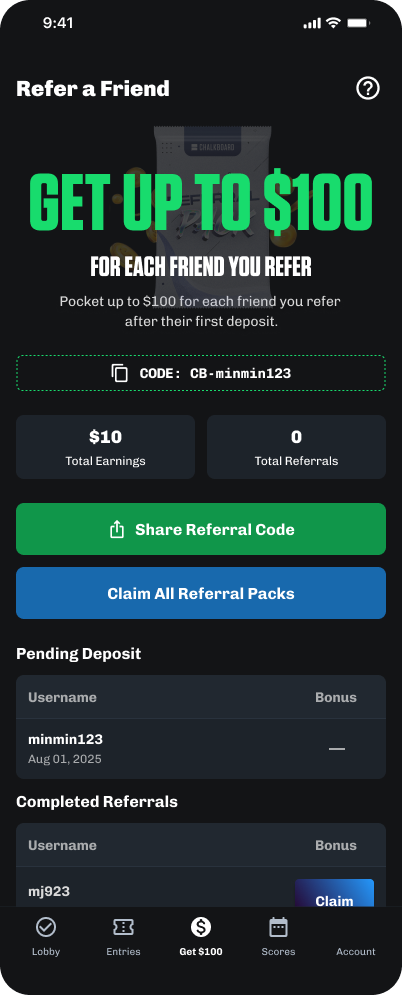
  • Edge cases for scale. Sequential reveals when several packs are ready at once, a "Claim All Bonus" action, pagination for long referral lists, and the gated / pending / completed states carried over from V1.
Where it connects

The loop runs on the front door. Referral is gated on a verified, deposited account, so the same trust work that hardened registration is what makes the loop fundable, and the promotion engine means any future campaign rides the same surface without an engineering ticket.

The reward redesign, mapped state by state.

Like the verification work, this proposed V2 was designed as a system before it was designed as screens, every gate, trigger, and multi-pack collision accounted for on the board.

Gate Verified + deposited only Referral stays locked until ID verification and a first purchase, the loop runs on real accounts only.
V2 · verified + deposited gate screen
Reward One sum, capped Multiple flat $10 entry cards collapse into a single dollar promotion, "get up to $100," issued by the promotion engine.
Trigger Friend's first deposit The pack is sent the moment the referee's FTD clears, and a Claim button surfaces on the referrer's dashboard.
V2 · pack triggered at friend's first deposit
Edge 01 Several packs at once When multiple referrals convert together, packs reveal sequentially instead of colliding.
Edge 02 Claim All Bonus More than one pack waiting adds a "Claim All Bonus" CTA beneath Share Referral Code.
V2 · Claim All Bonus with multiple packs
Scale Long lists & sharing Pagination for growing referral lists, pending vs completed kept separate, and an updated share-link interaction with the native sheet.
V2 · long referral lists and sharing

Trust isn't a screen. It's a chain.

The most useful reframe at Chalkboard was that "onboarding" is the wrong unit. The work wasn't a flow, it was a chain of trust, and every weak link, an unverified email, a credential field that wouldn't say what was wrong, a cold permission prompt, a referral reward with no system behind it, leaked value downstream.

That's why the page reads as two moves, not five projects. First the front door: email verification, a unified validation system, and a permission system that earns the opt-in, so every account is real and reachable. Then the loop: a Refer-a-Friend gated on those verified accounts, with a proposed V2 reward that runs through the promotion engine. The second move only works because the first one happened, the loop is fundable precisely because the accounts feeding it are verified.

If I had a second pass, I'd have sequenced the verification headline even earlier, before the supporting systems. The validation and notification work made the existing flow better; verification changed what the flow was for. The headline move sets the stage for every supporting one.